
See what you input, what suppliers do, and what you get.
No vague marketing promises, no black-box claims. Below is the complete step-by-step technical breakdown of Evidlane: full-size production screenshots, exact parameter definitions, and the certified deliverables you hand to auditors.
1. Upload Your Existing Approved Supplier List (.CSV) & Map Schema
You do not need to hire an IT consultancy or spend 6 months migrating databases. Take your facility's current Excel or Google Sheets Approved Supplier List (ASL), export it as a standard .csv file, and drag it into Evidlane. Our intelligent parser reads your headers, establishes compliance slots, and eliminates duplicate entries.
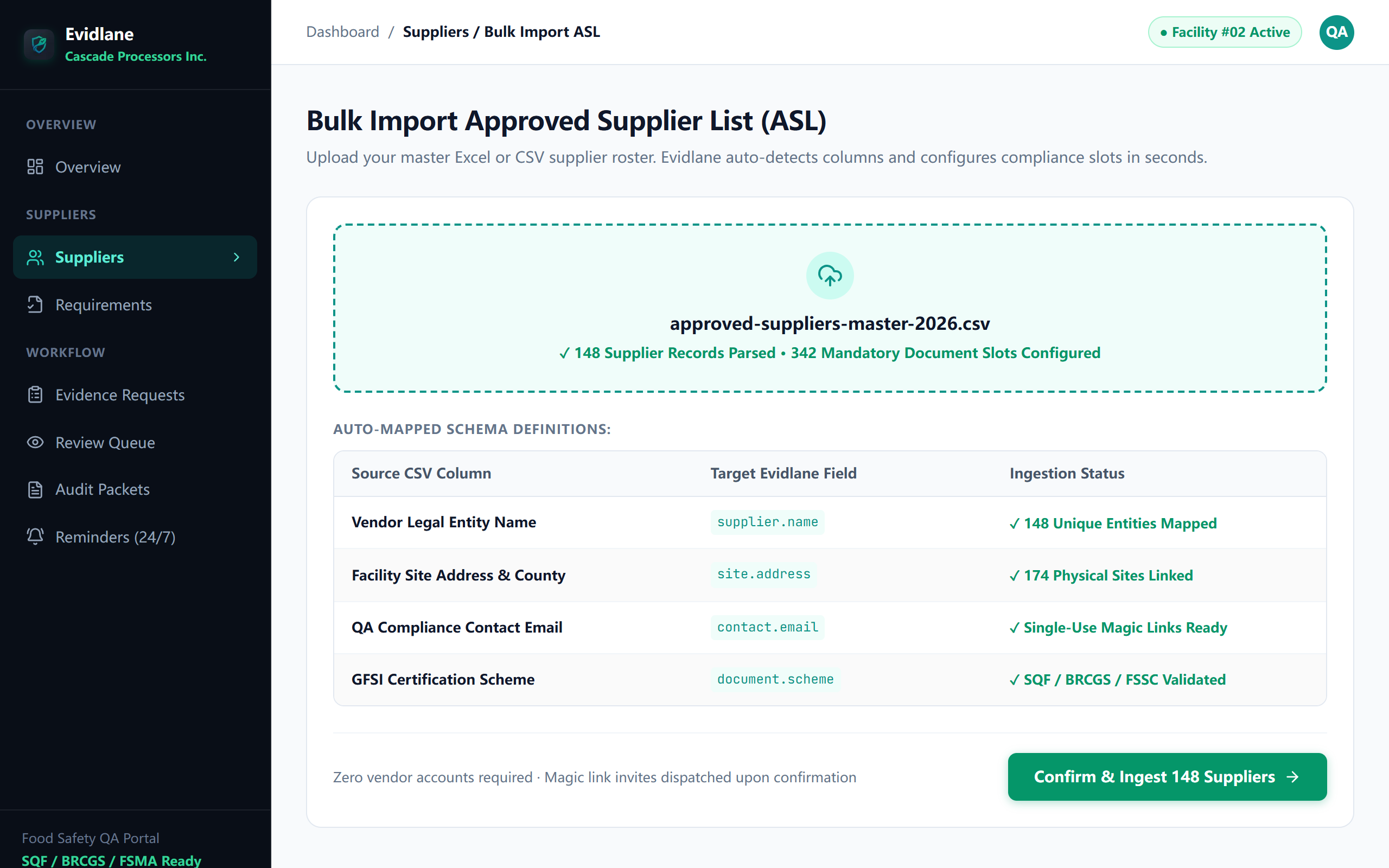
Step 1 Input Parameters & Schema Mapping Dictionary
Every row in your uploaded CSV corresponds to a supplier facility. Evidlane validates each parameter via Zod schemas before saving to the database:
| Your CSV Column Header | Target Evidlane Field | Required? | Validation & Type | SQF / FDA Regulatory Purpose | Example Data |
|---|---|---|---|---|---|
| Vendor Legal Entity Name | supplier.name | Mandatory | String (2 - 200 chars), unique per facility | Legal entity identified on statutory purchase orders | Pacific Organic Grain Corp. |
| Facility Site Address / Mill # | site.address | Recommended | String (max 160 chars) | FSMA 204 Traceability Location Identifier (TLI) | Facility #02 (Oregon Mill) |
| QA Compliance Contact Email | contact.email | Mandatory | Valid RFC 5322 Email Address | Destination for single-use zero-login Magic Links | qa@pacificorganicgrain.com |
| Supplier Risk Classification Tier | riskTier | Optional (Defaults to Tier 1) | HIGH_RISK | MEDIUM | LOW | Dictates required audit depth (SQF 2.3.4.1) | HIGH_RISK (Allergen Raw) |
| Baseline Approval State | approvalStatus | Optional (Defaults to PENDING) | PENDING | APPROVED | BLOCKED | Legal approval baseline for ERP purchase authorization | APPROVED |
| GFSI Certification Scheme | document.scheme | Optional | SQF, BRCGS, FSSC 22000, PrimusGFS, IFS | Auto-configures document slots and OCR validation criteria | SQF Edition 9 (Module 11) |
2. Suppliers Upload via Single-Use Magic Link (No Login, No Accounts, No Fees)
Traditional software portals (like TraceGains, SafeFood 360, or Trace One) fail because they demand external suppliers create accounts, remember passwords, and pay expensive fees. Suppliers refuse, leaving QA teams chasing certificates for months over email. Evidlane sends suppliers a zero-friction, single-use Magic Link that opens directly into their submission tray on desktop or smartphone.
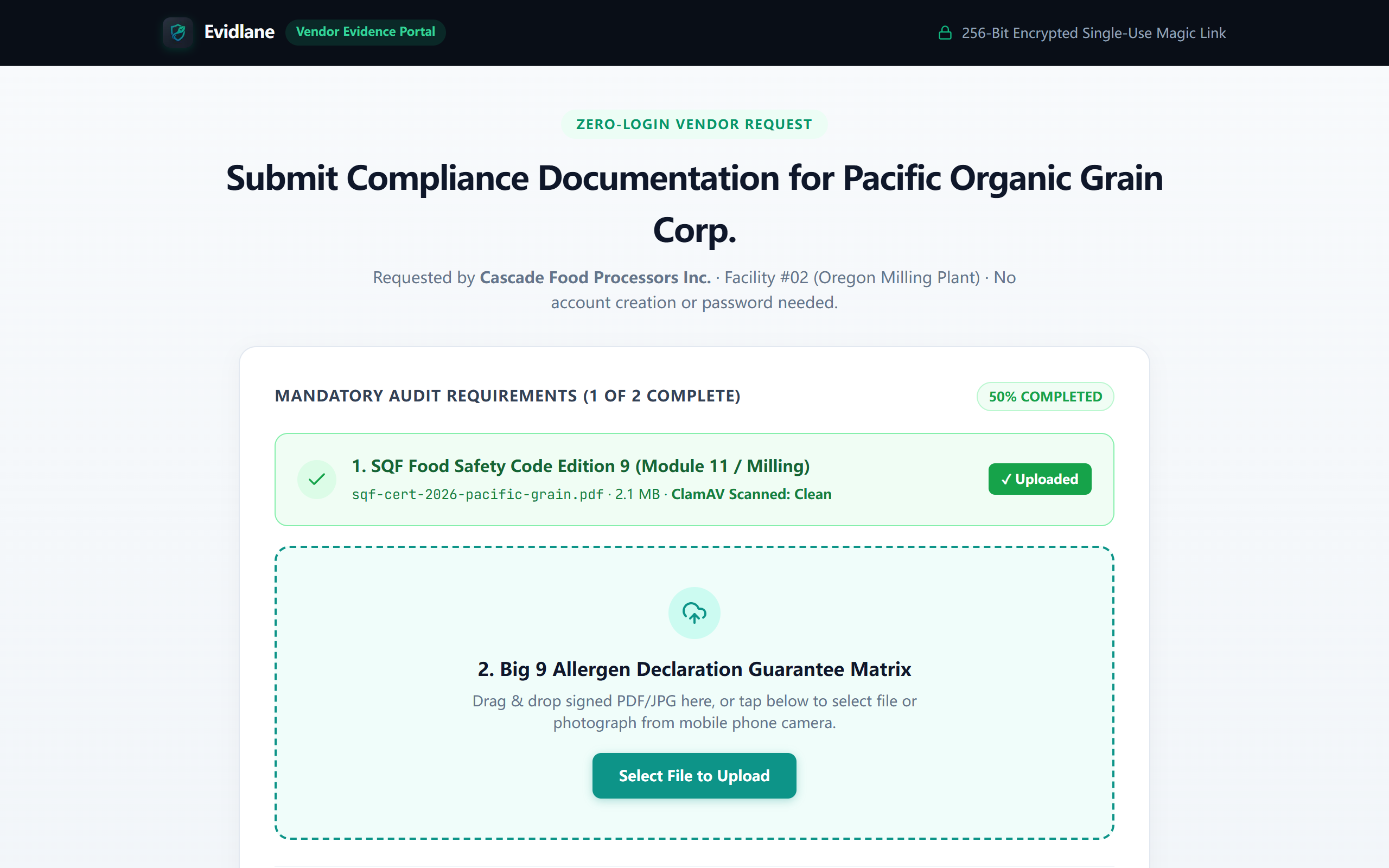
Step 2 Vendor Intake Parameters & Upload Specifications
What external vendors experience when interacting with their assigned Magic Link:
| Component / Parameter | Technical Attribute | Supplier Action Required? | Allowed Formats & Limits | Security & Automated Inspection |
|---|---|---|---|---|
| Single-Use Token Link | token (hash) | None (1-click open) | 32-byte cryptographic entropy URL | Expires automatically upon completed PCQI review |
| File Upload Dropzone | file payload | Mandatory per slot | .pdf, .jpg, .png (Max 25 MB/file) | Scanned by ClamAV Antivirus prior to QA preview |
| Document Slot Assignment | requirementId | Auto-selected | e.g. SQF Cert, Allergen Guarantee, Pest Log | Prevents vendors from uploading wrong files into wrong slots |
| SHA-256 Tamper Ledger | checksumHash | Auto-calculated | 256-bit hexadecimal string | Guarantees the uploaded file has not been altered since submission |
3. Autonomous 30/14/7-Day Expiry Loops & PCQI Human Review Queue
You never have to calculate certificate expiration dates or manually draft reminder emails again. Autonomous background cron engines monitor your entire supplier network 24 hours a day. When new certificates arrive, Optical Character Recognition (OCR) extracts dates and ClamAV verifies virus clearance. PCQI human auditors approve or request corrective actions in 1 click.
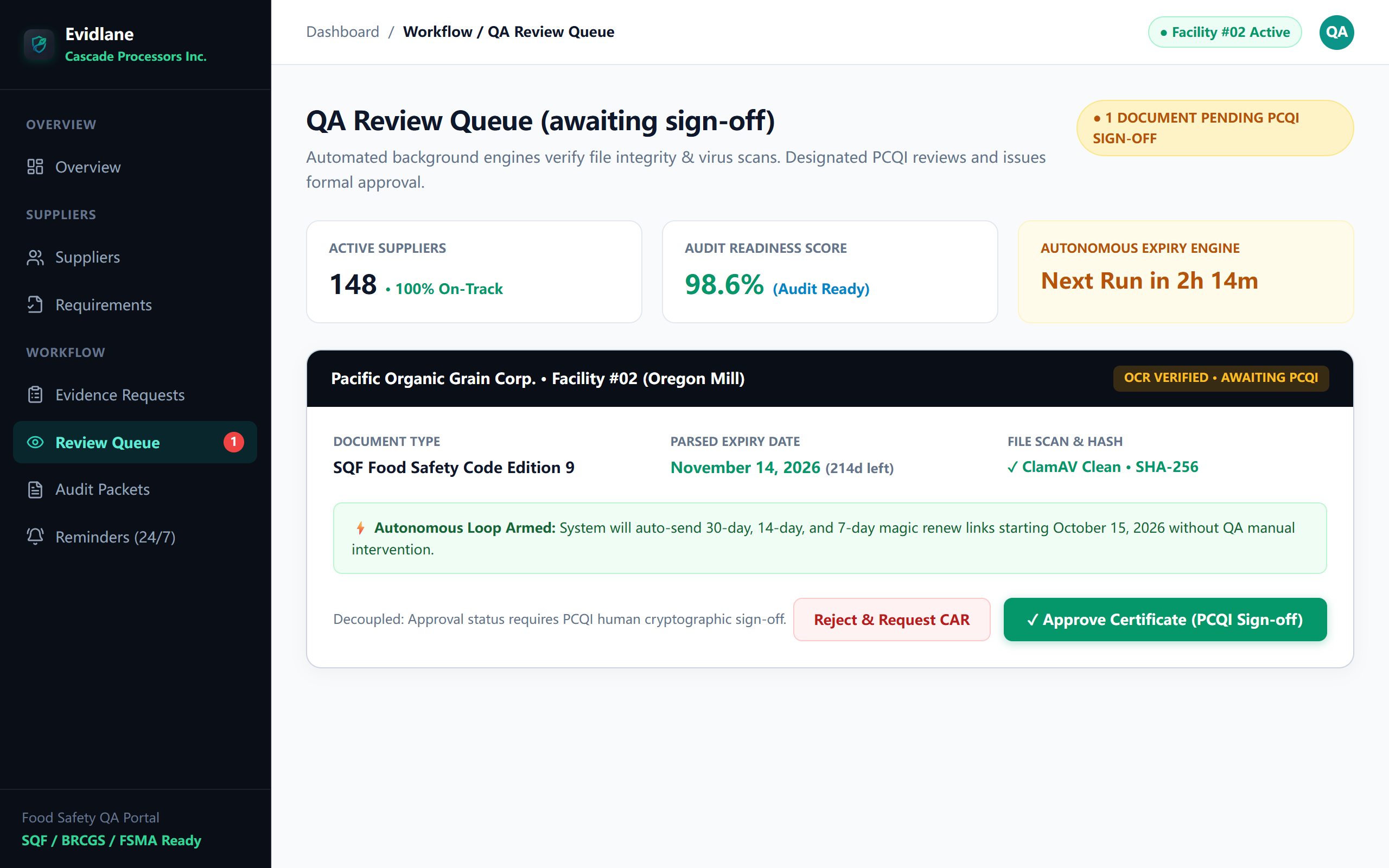
Step 3 Review Queue & Autonomous Cadence Parameter Dictionary
How the autonomous cron engine and designated PCQI reviewers evaluate and act upon documents:
| Workflow Parameter | System Field | Calculation Engine | Compliance Threshold | Decoupled Logic Rule |
|---|---|---|---|---|
| Audit Readiness Score | metrics.readiness | (Valid Approved Slots / Total Required Slots) * 100 | > 95% = Audit Ready | Calculated dynamically across active vendor roster |
| Expiry Reminder Cadence | cron.reminderCadence | Dispatched at T-30d, T-14d, T-7d, and T-0d | Autonomous (Zero QA hours) | Pauses automatically upon vendor new upload |
| Parsed Certificate Expiration | document.expiryDate | OCR pattern extraction from certificate footer | ISO 8601 Date (YYYY-MM-DD) | Requires human PCQI sign-off before entering legal register |
| Antivirus Integrity Scan | scanStatus | ClamAV Daemon private container scan | Must return CLEAN | Infected files quarantined instantly; vendor notified to re-upload |
| PCQI Approval Action | decision: APPROVED | Single click by authorized PCQI reviewer | Immutable Ledger Write | Logs User Email, UTC Timestamp, and SHA-256 Checksum |
4. The 1-Click Sealed Audit Packet (Signed ASL PDF + Structured ZIP Archive)
When an unannounced SQF, BRCGS, or FDA inspector walks through your facility door, your QA team does not need to panic or search through messy email folders. Click Export Sealed Audit Packet. In under 15 seconds, Evidlane compiles an official timestamped Approved Supplier Register (ASL) PDF and a clean ZIP folder bundle of all original certificates backed by an immutable SHA-256 proof ledger.
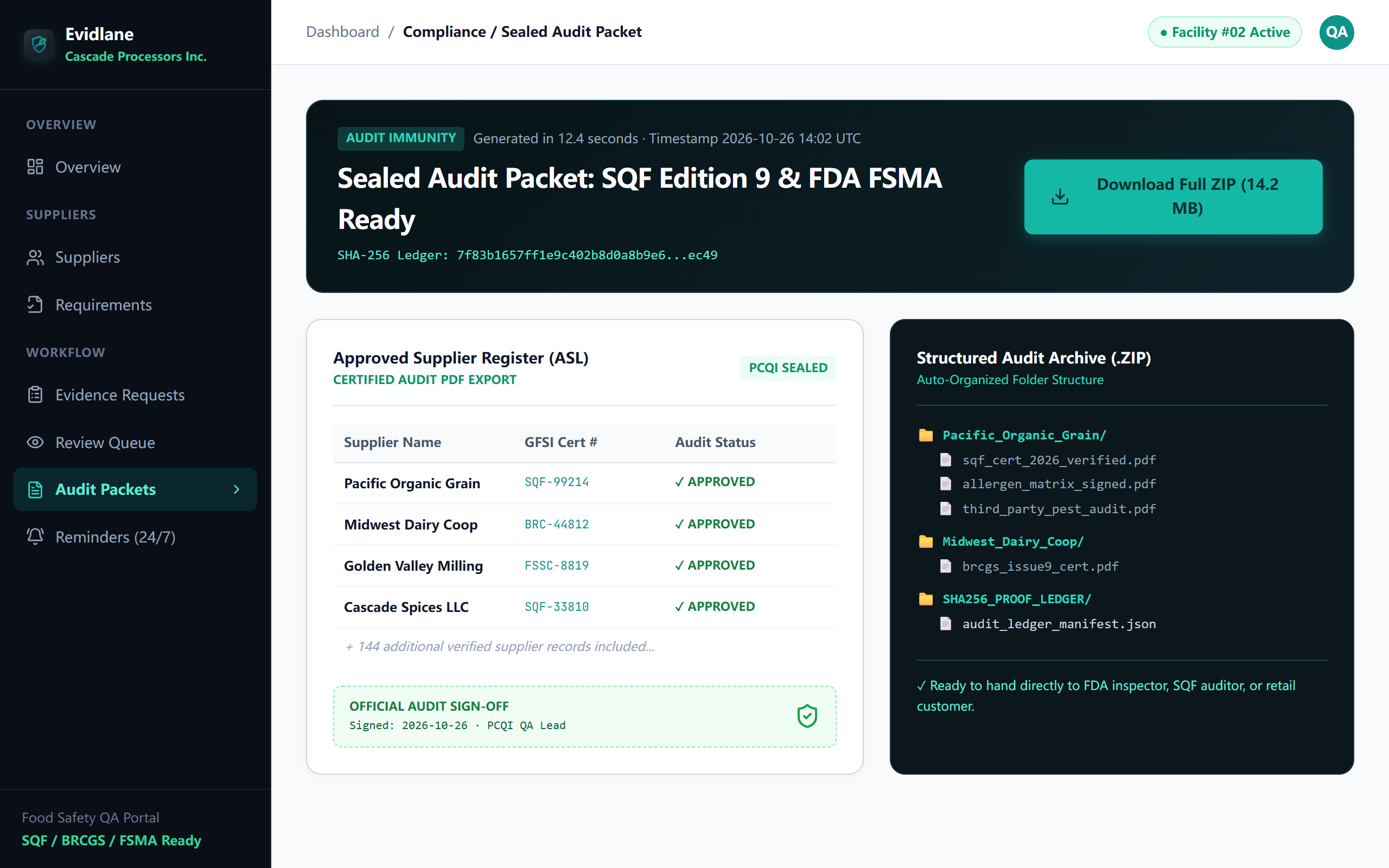
Step 4 Sealed Audit Packet Deliverable Structure
What is packaged inside the downloaded ZIP file when you hand it to an auditor on a flash drive or via secure link:
| Deliverable Asset | File Path in ZIP | Format & Encoding | Auditor Verification Contents | Standards Satisfied |
|---|---|---|---|---|
| Approved Supplier Register (ASL) | /ASL_Master_Register.pdf | Certified Vector PDF | Roster of 148 vendors, GFSI cert numbers, validity dates, risk tiers, and official PCQI signature stamp | SQF 2.3.4, BRCGS 3.5.1.1, FSMA 21 CFR 117.410 |
| Organized Vendor Evidence Subfolders | /[Supplier_Name]/... | Original PDFs / Scans | Individual original certificates (e.g. sqf_cert_2026.pdf, allergen_matrix.pdf, pest control audits) | Third-party auditor document verification |
| Cryptographic Proof Ledger | /audit_ledger_manifest.json | JSON (SHA-256 Hash Manifest) | Cryptographic hashes for every single document, reviewer email, IP, and UTC timestamp proving zero tampering | FDA 21 CFR Part 11 Electronic Records |
Experience the 4-step pipeline on your own facility.
Deploy in under 10 minutes with your existing CSV spreadsheet. No credit card required, unlimited suppliers during your 14-day trial.